On this page
On a sunny day my 5 kW Huawei inverter exported most of its power for a few cents, while the Vaillant heat pump heated the house in the evening from the grid. The fix is simple in theory: when there is surplus solar, let the heat pump store it as heat in the rooms and the hot water tank. This post shows how I did it with a €5 ESP32, what I measured, and the traps that cost me the most time.
Verified vs. model-dependent. Everything marked ✅ runs in my house: SUN2000-5KTL-M1 with SDongle, aroTHERM split VWL 75/5 AS + uniTOWER VWL 78/5 IS, VRC 700, firmware on a Lolin S3 Mini. Anything marked ⚠️ depends on your model, firmware or installation: check your manuals before copying it.
What you'll build
- An ESP32 reads the inverter every few seconds over Modbus TCP (✅).
- Every 10 minutes it decides whether there is enough steady surplus to run the heat pump on solar.
- If yes, it raises the room target by a few degrees for a limited time (a Vaillant quick veto, ✅) and, optionally, the hot water target.
- If the sun goes, grid import starts or the room is warm enough, it stops. It never goes beyond limits you set.
- A small web dashboard on the ESP32 shows everything, without any cloud of its own.
Hardware
| Part | What I use | Notes |
|---|---|---|
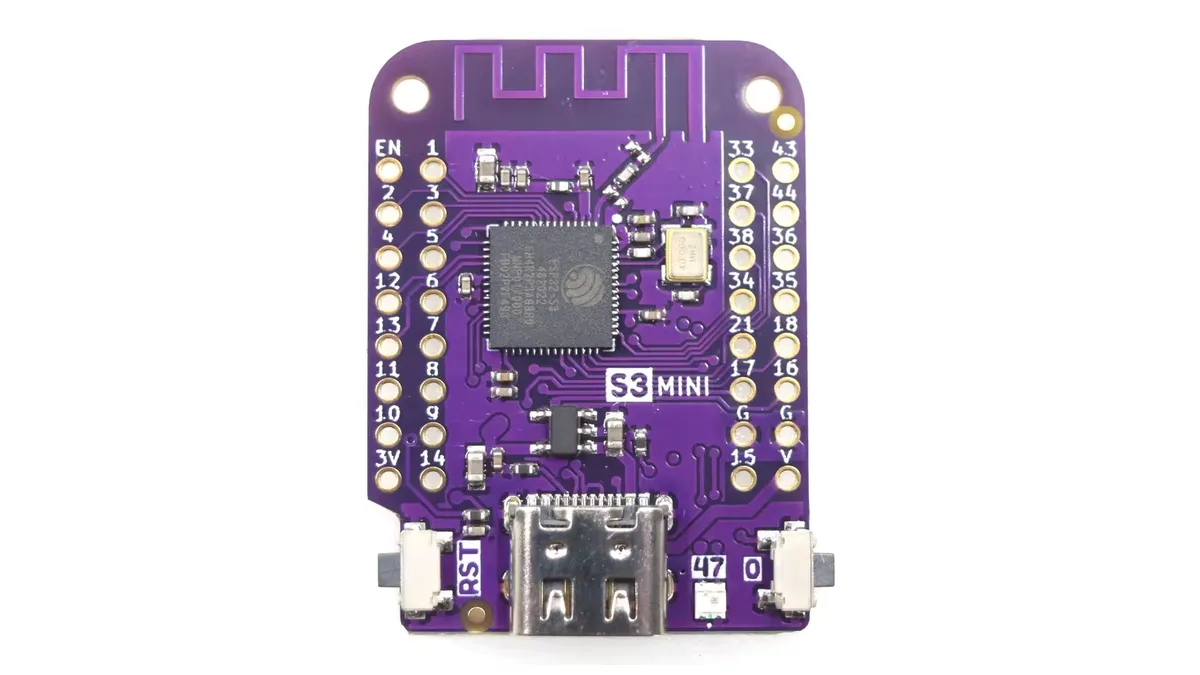
| Microcontroller | Lolin S3 Mini (ESP32-S3, 4 MB flash, 2 MB PSRAM) | ✅ Any ESP32 with Wi-Fi works; the S3's PSRAM helps with large JSON responses |
| Power | USB-C phone charger, 5 V ≥ 1 A | ✅ Certified supply only; the board draws about 0.5 W |
| Inverter link | Huawei SDongle (Wi-Fi/LAN) | ✅ Modbus TCP on port 502; no wiring to the ESP32 |
| Heat pump link | myVAILLANT gateway (VR 920/921) or an eBUS adapter | ⚠️ See the three options below |
| Optional relays | Optoisolated relay module with 3.3 V logic input | ⚠️ Only for loads or an SG Ready input your manual documents |
Connecting it
- Power the ESP32 from USB-C. The first flash goes over USB, all later updates over Wi-Fi (ArduinoOTA).
- No wire to the inverter. The SDongle is already on your Wi-Fi; the ESP32 talks to it over the network.
- Relays (optional): relay
INto a free GPIO,GNDtoGND, relayVCCto whatever the module specifies. On the S3 Mini avoid the strapping pins (0, 3, 45, 46), USB (19, 20) and the RGB LED (47). - Anything with mains voltage or heat pump terminals is for a qualified electrician. The ESP32 never connects directly to mains, and never to a Vaillant terminal unless the installation manual names that terminal as a potential-free input for exactly this purpose.
Part 1: reading the Huawei inverter
Modbus TCP or RTU?
| Route | How | Status |
|---|---|---|
| Modbus TCP via SDongle | Wi-Fi/LAN, port 502, unit ID 1 | ✅ What I use |
| Modbus RTU via RS485 | Inverter COM port, needs an RS485 transceiver (e.g. MAX3485 module) | ⚠️ Pinout and termination are model-specific; the SDongle may then not be usable at the same time |
To enable Modbus TCP, an installer account in the FusionSolar app or web portal sets the dongle's Modbus TCP to "Enable (Unrestricted)" (⚠️ the menu name varies with app version). After that, port 502 answers on the local network.
The trap that cost me a day: the SDongle accepts one Modbus TCP client at a time. If Home Assistant, a phone app or a second ESP is connected, your reads time out. Pick one reader and give everything else its data from there.
Two more quirks: wait about one second after connecting before the first request, and read in blocks of at most 64 registers with a small gap between requests.
Registers that matter (✅ verified on SUN2000-5KTL-M1)
All are holding registers read with function code 03. 32-bit values are big-endian (high word first). The list is cross-checked against wlcrs/huawei-solar-lib.
| Register | Type | Gain | Meaning |
|---|---|---|---|
| 32064 | I32 | 1 | PV input power (W) |
| 32080 | I32 | 1 | Active AC output power (W), the "solar" value I use |
| 32114 | U32 | 100 | Yield today (kWh) |
| 32106 | U32 | 100 | Total yield (kWh) |
| 37100 | U16 | 1 | Power meter status (1 = online), only with a Huawei smart meter |
| 37113 | I32 | 1 | Grid power at the meter (W): positive = export, negative = import |
| 37119 / 37121 | I32 | 100 | Exported / imported energy (kWh) |
House consumption isn't a register. With a meter: consumption = active power − grid power. Without a meter
(my case) the firmware estimates grid = house base load + heat pump + car − solar, with the house base load as
a setting (300 W for me).
Firmware: one request, decoded
I use eModbus, which queues requests and calls you back asynchronously:
#include <WiFi.h>
#include "ModbusClientTCP.h"
#include "secrets.h"  // WIFI_SSID, WIFI_PASSWORD

WiFiClient wifiClient;
ModbusClientTCP modbus(wifiClient);
const uint32_t TOKEN_AC = 1;

int32_t readI32(ModbusMessage& msg, uint16_t offsetRegisters) {
  uint16_t high, low;
  // Byte 3 is the first data byte after unit ID, function code and byte count.
  msg.get(3 + offsetRegisters * 2, high);
  msg.get(5 + offsetRegisters * 2, low);
  return (int32_t)(((uint32_t)high << 16) | low);
}

void onData(ModbusMessage msg, uint32_t token) {
  if (token == TOKEN_AC) {
    int32_t pvInputW = readI32(msg, 0);          // 32064
    int32_t activePowerW = readI32(msg, 16);     // 32080
    Serial.printf("PV %ld W, AC %ld W\n", (long)pvInputW, (long)activePowerW);
  }
}

void onError(Error error, uint32_t token) {
  Serial.printf("Modbus error %02X on request %u\n", (int)error, (unsigned)token);
}

void setup() {
  Serial.begin(115200);
  WiFi.begin(WIFI_SSID, WIFI_PASSWORD);
  while (WiFi.status() != WL_CONNECTED) {
    delay(200);
  }
  modbus.onDataHandler(&onData);
  modbus.onErrorHandler(&onError);
  modbus.setTimeout(5000, 200);                  // response timeout, gap between requests (ms)
  modbus.begin();
  modbus.setTarget(IPAddress(192, 168, 1, 11), 502);
}

void loop() {
  static uint32_t last = 0;
  if (millis() - last > 5000 && modbus.pendingRequests() == 0) {
    last = millis();
    modbus.addRequest(TOKEN_AC, 1, READ_HOLD_REGISTER, 32064, 18);  // 32064..32081
  }
}
Part 2: monitoring and controlling the Vaillant heat pump
There are three ways in. They differ a lot in effort and risk:
| Route | What you get | Local? | Status |
|---|---|---|---|
| myVAILLANT cloud (via the VR 920/921 gateway you already have) | Room/hot water temperatures, modes, energy, quick veto, hot water target | No | ✅ What I use, unofficial API |
| eBUS adapter + ebusd | Everything on the bus: flow/return temperatures, compressor data, setpoints; writing setpoints | Yes | ⚠️ Not in my setup yet; message definitions vary by controller firmware |
| SG Ready / energy manager input | Two potential-free contacts: "solar surplus, heat more" | Yes | ⚠️ Only if your unit's manual documents the input; wiring by an installer |
The cloud route (what I run)
The gateway has no local API; the myVAILLANT app talks to Vaillant's cloud, and so does the ESP32. The open-source myPyllant library documents the API; I ported the parts I need to C++. Three things are important:
- Sign-in is OAuth with PKCE, done by you once in the browser. Don't try to automate the login page.
- The API is rate limited. Answer
403 "Out of call volume quota"by waiting exactly as long as the message says. My firmware polls status every 5 minutes while there's sun, every 15 minutes otherwise: about 400 calls a day. - The cloud lags. After a change, the old value comes back for several minutes. Trust your own change for ~10 minutes instead of reacting to stale data.
The control I use is the quick veto: a temporary room target with a duration, which the controller removes by
itself when it expires. That makes it fail-safe: if the ESP32 dies mid-boost, the heating returns to normal on its
own. On the VRC 700 the endpoint is PATCH …/zone/{index}/heating/quick-veto, and it needs both
desiredRoomTemperatureSetpoint and duration (duration alone returns HTTP 400 ✅).
The local route: eBUS
The VRC 700, the heat pump and the gateway share eBUS, a two-wire low-voltage bus. A dedicated adapter (for example the ebusd adapter, which has an ESP32 on board) sits on the bus, and ebusd with the ebusd-configuration message files decodes it. Never wire eBUS to ESP32 pins directly: the bus runs at a much higher voltage than 3.3 V and needs a proper interface circuit.
Once ebusd runs, discover what your controller exposes instead of guessing names:
ebusctl find            # lists all messages ebusd knows for your devices
ebusctl read <name>     # read one value, using a name from the list above
ebusd can publish everything to MQTT, which your automation (or the ESP32) subscribes to. ⚠️ Start read-only; write setpoints only after you've confirmed the exact message on your controller firmware.
Part 3: the automation, safely
The decision, every 10 minutes
spare = solar − house base load − car (if charging)           # 1 s samples, 10-min average
level = highest level whose start is reached
        and where spare − learned heat pump draw ≥ margin
start only if   spare ≥ level 1 start for ≥ 80 % of the window   # steady sun, not one sunny minute
          and   ≥ 30 min since the last boost ended                # protects the compressor
stop if         grid import > 30 Wh in the window                  # checked every second
           or   no level fits any more
target          = day temperature + level offset (+1 … +4.5 °C), never above the cap (24.5 °C)
Things I learned the hard way:
- Learn the heat pump's real draw, but only while it heats the room. A hot water reheat pulls ~1.8 kW; when that leaked into the "level 1 draw" (really ~0.8 kW), boosts stopped starting at all.
- Don't count hot water reheats as boost failures. The controller starts them on its own schedule; ending your room boost doesn't stop them.
- Use steadiness, not averages, to start. One sunny gap between clouds shouldn't start a compressor.
Hot water: move it, don't fight it
Hot water is the easiest load to shift, because the tank holds heat for hours. The most robust step costs no code: in the VRC 700 (or app) allow hot water only from 11:00 to 15:00. On top of that the ESP32 can raise the hot water target with surplus and restore it afterwards (it remembers the original value in flash, so a restart still restores it).
Safety rules in the firmware
- Every change is temporary (quick veto with a duration) or remembered and restored (hot water target, heating mode), also after a power cut.
- Hard caps: maximum room target, maximum hot water target, maximum pause time (18 h).
- If data is missing or stale, the boost ends. No data never means "heat more".
- The heat pump's own protections (frost protection, legionella program, minimum run times) stay untouched.
My controller heats a 22 °C room. Why?
With room temperature control set to "None", the VRC 700 follows only the outdoor temperature and ignores the room. Two fixes: switch room control to "Active"/"Thermostat" in the installer menu (⚠️ only if the controller hangs in a living room), or, as my firmware does, pause heating while the room is above its target and there's no sun, and resume it when the room is back at the target.
Setup, step by step
- In FusionSolar (installer account) enable Modbus TCP on the dongle; note its IP.
- Flash the ESP32 once over USB with Wi-Fi credentials and the dongle IP; check the serial log for readings.
- Open the dashboard, sign in to myVAILLANT (or point the firmware at ebusd/MQTT).
- Set house base load, boost levels, caps and the import tolerance; start in Auto with conservative values.
- Watch a sunny day in the history chart: solar, heat pump draw, estimated grid import and boost periods.
- Tune: lower the level 1 start to the heat pump's real minimum draw (~0.7–0.9 kW for my unit).
Troubleshooting
| Symptom | Cause and fix |
|---|---|
timeout reading 30000, no inverter data | Another Modbus client holds the SDongle. Disconnect it; only one reader at a time |
| First request after connect fails | Wait ~1 s after the TCP connect before reading |
| Some blocks return exceptions | Not every model has every register (meter, battery). Mark them unsupported and retry rarely |
myVAILLANT 403 Out of call volume quota | Too many calls. Wait the stated time, then poll less often |
HTTP 400 when extending a quick veto (VRC 700) | Send the setpoint together with the duration |
| Boost never starts although there's sun | Check the learned draw per level; reset it if a hot water reheat inflated it |
| Heat pump starts and stops a lot | Require steady surplus and a rest time between boosts |
Open-source projects worth knowing
- wlcrs/huawei-solar-lib and wlcrs/huawei_solar: Huawei Modbus register map and Home Assistant integration.
- eModbus/eModbus: asynchronous Modbus TCP/RTU for ESP32.
- signalkraft/myPyllant and signalkraft/mypyllant-component: myVAILLANT API and Home Assistant integration.
- john30/ebusd and john30/ebusd-configuration: local eBUS daemon and message files.
- evcc-io/evcc: surplus charging for cars (and heat pumps via SG Ready).
- Open-Meteo: free weather and irradiance forecast to plan the next day.
Summary
Reading a Huawei inverter is easy once you know the one-client rule and the register map. Controlling a Vaillant heat pump safely is the harder half: use temporary, self-expiring changes, respect the cloud's rate limits (or go local with eBUS), and add patience to your rules (steady sun, rest times) so the compressor isn't stressed. The result in my house: on sunny days the heat pump runs on solar, the house stores the heat, and in the evening the heating pauses instead of buying it back from the grid.